Vector images
 These are not made by pixels like JPEG, GIFs and BMP images. Points, lines, curves and shapes or polygons. This allows images and text to be more clear which also alllows the text to be smaller as if it were made of pixel, you would just see couloured squares as the rastered image would try to produce the letter and . Mathematical equations are used to process these vector images which allow them to have such smooth edges and not look pixelated close up lie rasterised images. These are found in the file formats of ai, svg, fla, wmf and eps.
Raster Images
 A rastered image is an image that consists of pixels. A Vector Image can be rasterised to be able to use "free transform" if it is not rasterised, it won't be able to be free transformed since the image is not made of pixels but if it was rasterised, it is able to be edited and changed. For example, the text in Photoshop is a vector image but you can only use free transform when it has been rasterised as you can stretch and bend the text. These type of images can not be enlarged without losing the quality of the picture and the pixels get wider and everything becomes more distorted.
The Pixel
Pixels (Picture Elements) are basically little squares that are formatted as colours as many different pixels join together to create a high quality image or piece of art. Pixels are put together with thousands of other pixels to create a high resolution image that looks very clear and as all of the pixels work together to add extra detail to make it look more realistic and better.Colour Depth
Colour depth, which is also known as pixel or bit depth which basically refers to the number of bits in per pixel on a computer monitor which represents a specific colour depending on how many bits there are. If there are more bits per pixel, there will be a wider variety of colours that will be brighter and in better quality.Colour Models
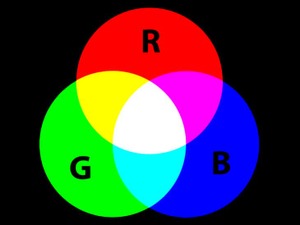 A colour model is an abstract mathematical model and this overall results in seeing millions of different colours from the colour space. These can be represented as tuples of numbers which usually three of four values or colour components. Commonly used colour models are RGB, CMYK and Lab colour. RGB is designed to have more options whilst working on a monitor as you can easily change the shades of colours by adding the colours together as the colour values can be altered from 0-255. CMYK is used mainly for printed work such
 Resolution
Resolution is basically the amount of pixels that an image have of the width and height. For example, a 1080p image or video would have 1920 pixels going across in the width while the height would have 1080 pixels. If there are not enough pixels that can bit fit on the screen of the monitor, then the image will look distorted and pixelated as there are not enough pixels to reach to the edge of the screen.Anti-Aliasing
This is a software technique used in computer graphics design which focuses on making jagged and rough edges into smoother edges. Anti aliasing uses the techniques of shading the edges of a jagged image with shades of grey which makes it look more smooth and clean.Aspect Ratio
This is the way images are measure in an x:y format, for example, 16:9 is a common aspect ratio used in images and videos. It describes the proportional relationship between its width and height, the length is assigned to whatever digits the image is. It could be 16 inches long and 9 inches wide or 16 pixels wide and 9 pixels tall. The smallest aspect retio is 1:1 which would turn out to be in the shape of a square.File Formats
There are many different file formats that are all different from each other as they carry out different tasks and perform differently form others. This is how the images are generally saved or made into a png, jpg file. For example, files could be saved as a .PSD or .ai which allows that file to be reopened with all of the layers still on it which makes it easily editable. However, this means that an image have not yet been rendered meaning that it can't actually be posted anywhere. When the layers are all comprssed/ flattened, then the image can be processed and made into a file such as a png or a jpeg. There are many file formats that can also relate to other things such as videos, documents, font files and a lot more.Compression
This is the technique of reducing the number of bits in an image or video needed to represent data. This makes the file size of it smaller which will take up less room in the hard drive and it also it speeds up the process of transferring data.Image Capture Devices
These are used to capture an image or a series of images from a real life event that looks exactly like an image you can see using the human eye. Nowadays, camera are used very commonly as most if not all mobile phones have a camera within them. These are used to capture memories of a certain time which could relate to friends and family or anything. The resolution of a camera is mesured using megapixels. One megapixel represents that there are one million pixels. Different cameras have different megapixels which basically tells us that the more mega pixels that are in a camera, the higher quality that the picture will look.
Optimising
Optimise is the word used to describe things similar to the best or the most effective, useful or fast flowing. In computers, it is the process of the computer writing or rewriting program instructions using maximum speed and efficiency.Storage and Asset Management
Storage management consists of the processes and organisations of data storage resources. This means that they are used to maximize or improve performance in data storage resources. This is included in virtualisation, deduplication, and compression which allow storage to be utilized better with a lower cost.
Asset management refers to any systems that monitor and maintain things of value to an entity or a group. Asset management is a systematic process of deploying, operating, maintaining, upgrading and disposing of assets cost-effectively. This helps as it it is very useful and the assets are very cost efficient which means that they are rather cheap.
Links:
http://shop.usa.canon.com/shop/en/catalog/cameras
Links:
http://shop.usa.canon.com/shop/en/catalog/cameras

No comments:
Post a Comment